

A B2B website redesign is easy to think about as a design project.
You audit the old website, create a new visual direction, build the pages, and launch.
But that's only the visible part of the process.
A successful B2B website redesign is a structured business process that connects discovery, strategy, content, information architecture, UX, UI, development, QA, and launch.
Each stage answers a different question. And each decision creates the foundation for the next one.
The process is structured, but it isn't completely linear. New insights can change earlier decisions, and good redesign work leaves room for iteration.
So what does the process actually look like?
Before deciding what the new website should look like, you need to understand the current one — and the business behind it.
Discovery is about collecting the information needed to make informed decisions.
This usually includes:
The goal isn't to find a list of things that look outdated.
It's to understand what is working, what isn't, and why.
A redesign based only on visual preferences can easily reproduce the same structural problems in a new interface.
Discovery gives the project a foundation for better decisions.
Once the current situation is understood, the next question is: What should the website do differently?
This is where business goals become website strategy.
The strategy defines things such as:
For a B2B company, this can be especially important because the website often has to serve multiple audiences and support a long buying journey.
The strategy creates a shared direction for the rest of the project.
Without it, different teams can optimise for different things: marketing wants more leads, design wants a stronger visual identity, product wants more information, and development wants a maintainable system.
A good redesign brings these priorities into one framework.
Content shouldn't be written after the design is finished. It is part of the design process.
Once the strategy is clear, the content needs to communicate the right message to the right audience in the right order.
This can include:
This is particularly important for complex B2B businesses.
The goal isn't to make the offering sound simpler than it is.
The goal is to make it easier to understand.
Content also gives the UX and design teams something real to work with. Instead of designing empty layouts with placeholder text, the team can design around the information the website actually needs to communicate.
Once you know what needs to be communicated, you need to decide where it belongs. That's the role of information architecture, or IA.
IA defines the structure of the website:
A useful way to think about it is:
Audience → Intent → Information → Journey → Action
The structure should reflect how people look for information — not necessarily how the company is organised internally.
For example, users shouldn't have to understand your internal departments before they can find the solution they need.
A strong IA makes the website easier to navigate before any visual design is introduced.
Information architecture defines the structure.
UX defines how people move through it.
At this stage, the team works through key user journeys and interactions to make sure the website helps visitors move from a question or problem towards the right next step.
That might mean:
Problem → Solution → Value → Proof → Process → Action
Different audiences may follow different paths.
A first-time visitor may need to understand the problem you solve.
A qualified prospect may be looking for proof, technical details, or implementation information.
Someone ready to talk may simply need a clear and frictionless way to contact the company.
UX brings these scenarios together into an experience that feels logical rather than forced.
This is also where potential friction can be identified before development begins.
The UI should express the strategy and make the content and UX easier to understand — not compensate for missing decisions.
The design system may define:
At this point, the team isn't asking:
"How can we make this page look impressive?"
The better question is:
"How can design make this message clearer and this experience easier to use?"
A strong visual identity matters, especially when a company has evolved beyond its old website.
But visual design works best when it is connected to the business strategy, messaging, and user experience underneath it.
Once the experience and interface are defined, the website needs to become a functioning digital product.
Development translates the approved experience into a scalable technical system.
This can include:
A key consideration is what happens after launch.
If every new page, campaign, or content update requires significant development effort, the website will quickly become a constraint again.
A good technical foundation should make it easier for the business and marketing team to keep evolving the website.
A website can look perfect in a design file and still fail in the real world.
That's why QA needs to be part of the redesign process, not a final formality.
A comprehensive QA process can cover:
Functional → Responsive → Browser → Content → Forms → Performance → Tracking → SEO
This means checking everything from interactions and navigation to mobile layouts, forms, analytics, redirects, metadata, and page performance.
It also means testing the website across the environments where real users will experience it.
For B2B websites, seemingly small issues can have a real impact: a broken form, incorrect tracking, missing content, a mobile layout problem, or a technical SEO issue can undermine the work done across the entire project.
QA protects that investment.
Launch is more than pressing "publish".
Before a redesigned website goes live, the team needs to make sure the transition from the old experience to the new one is controlled.
A launch checklist can include:
The goal is simple:
The new website should be ready for real users, not just ready to be published.
And the process doesn't necessarily end on launch day.
Post-launch monitoring can reveal issues or opportunities that weren't visible before the website went live. These insights can feed into the next round of improvements.
There is no universal timeline. It depends on the size and complexity of the website, the amount of content, the number of templates, integrations, stakeholders, and technical requirements.
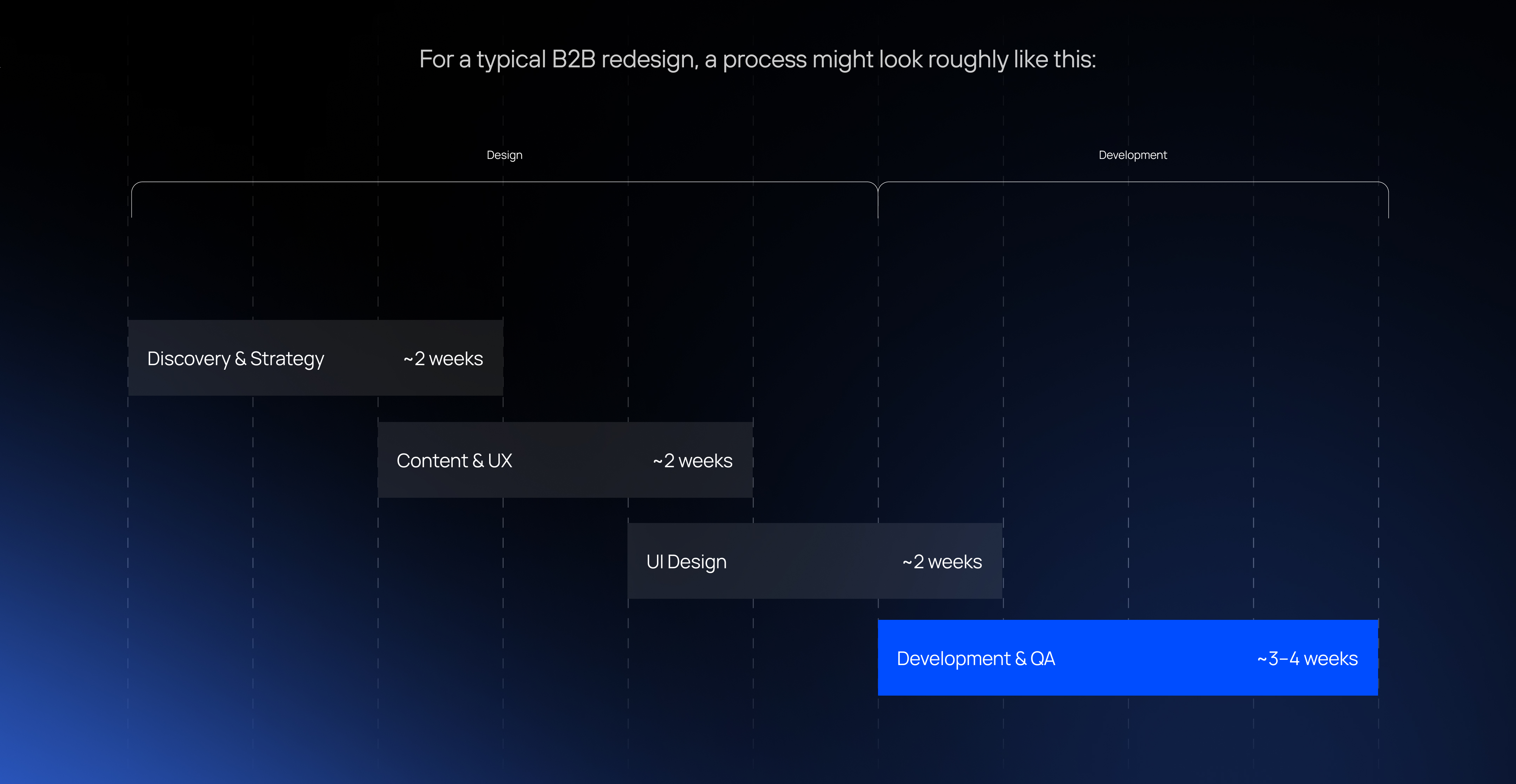
That means a focused redesign can take approximately 9–10 weeks from discovery to launch.
The timeline is not necessarily a strict sequence, though.
Content, UX, design, and development can overlap where appropriate. And insights discovered during one stage can lead to iterations in another.
The objective isn't to move through a checklist as quickly as possible.
It's to make the right decisions in the right order.
The most important thing about the process is how the stages connect.
Discovery tells you where you are.
Strategy defines where you need to go.
Content determines what needs to be communicated.
IA organises the information.
UX shapes the journey.
UI makes the experience tangible.
Development turns it into a scalable digital system.
QA makes sure it works.
Launch puts it into the hands of real users.
And then the cycle continues.
Because a website shouldn't be considered finished simply because it has launched.
The best B2B websites are designed to evolve with the business — whether that means adding new content, entering a new market, launching a new campaign, changing the positioning, or improving conversion.
That's why a website redesign shouldn't start with: "What should the new website look like?"
It should start with: "What does the business need the website to achieve?"
Once that is clear, strategy, content, UX, design, and technology can work together towards the same goal.
Planning a B2B website redesign? Start with the business problem, then build the digital experience around it.

A B2B website doesn't need a redesign just because it looks a little dated.

A B2B website can look impressive and still fail at its most important job: helping the business win cus...

Marketing agencies today are expected to deliver fast, high-quality digital experiences — websites, land...

 Start a project